Skip to product information
1 of 1

Simplecom

Simplecom KM430 Dual HDMI Monitor KVM Switch for 2 Computers with 4-Port USB Hub 4K@60Hz Keyboard Hotkey

Simplecom KM430 Dual HDMI Monitor KVM Switch for 2 Computers with 4-Port USB Hub 4K@60Hz Keyboard Hotkey
Regular price $99.95 AUD
Regular price Sale price $99.95 AUD
Sale Sold out
Tax included. Shipping calculated at checkout.

SKU:KM430

Availability : Only 17 left in stock!

View Product details
product-img
Simplecom KM430 Dual HDMI Monitor KVM Switch for 2 Computers with 4-Port USB Hub 4K@60Hz Keyboard Hotkey
Regular price $99.95 AUD
Regular price Sale price $99.95 AUD
Tax included. Shipping calculated at checkout.

Simplecom KM430 Dual HDMI Monitor KVM Switch for 2 Computers with 4-Port USB Hub 4K@60Hz Keyboard Hotkey

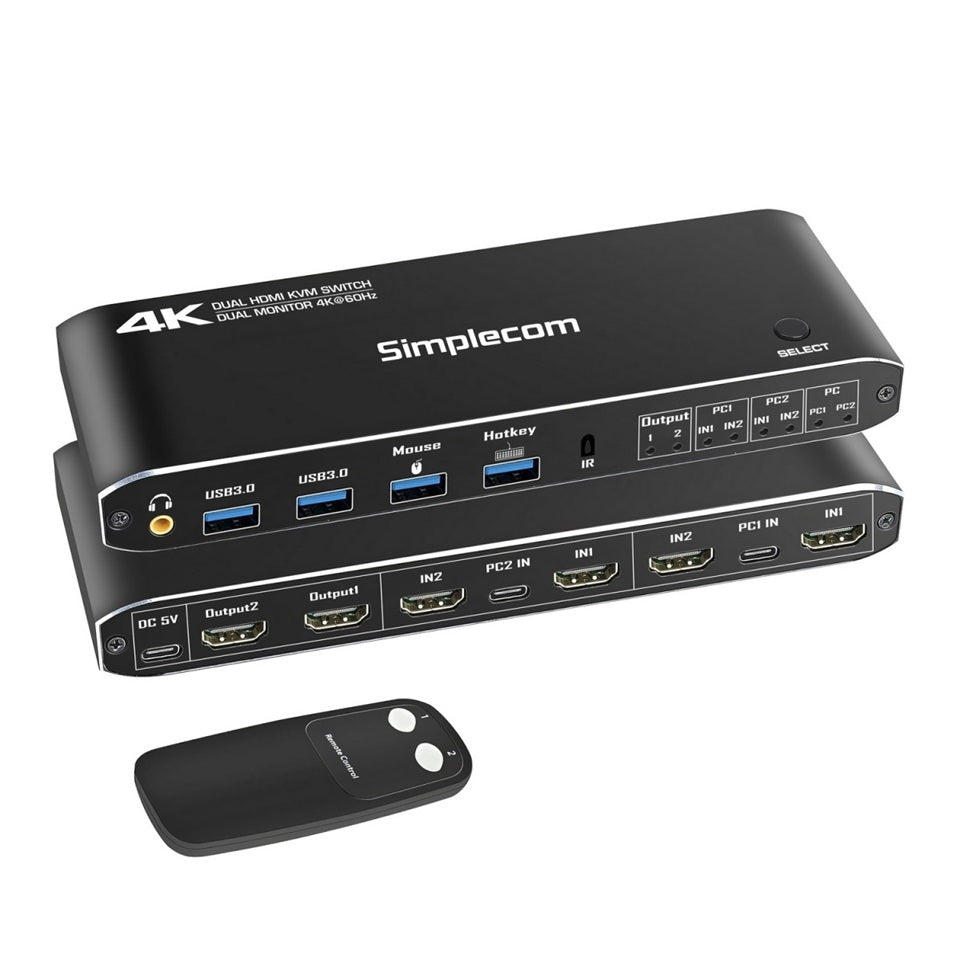
This Dual HDMI KVM Switch lets you control two computers with a single set of peripherals and dual monitors, making it ideal for multitasking across workstations or home setups. It supports both extended and mirrored display modes with HDMI 2.0 compliance, delivering ultra-high video resolution up to 4K@60Hz on both screens.

It features an integrated 4-port USB hub, allowing you to simultaneously switch both displays and connected USB peripherals. Switching between computers is easy via the front button, included remote control, or keyboard hotkeys (supported via the dedicated USB keyboard port).

It's plug-and-play, with no drivers required, and works seamlessly across multiple platforms. The durable aluminum alloy casing ensures long-lasting use and efficient heat dissipation. LED indicators provide clear status updates for active computer connections.

Perfect for professionals who require maximum productivity and multitasking capabilities, this dual HDMI KVM switch offers rich functionality and convenient, efficient switching, making it an ideal choice for multi-system setups.

Features

Dual HDMI KVM switch allows 2 computers to share 2 displays and 4 USB ports
Supports dual monitors in extended or mirrored modes
HDMI 2.0 compliant, support video resolution up to 4K@60Hz
Integrated 4-port USB hub toggled with the display simultaneously
Two SuperSpeed USB 3.0 ports support up to 5Gbps data transfer rate
Two USB 2.0 ports for connecting a mouse and keyboard
Easy to use by pressing the toggle button on the KVM switch or remote control
USB port for keyboard supports Hotkey function to switch computer
3.5mm audio output port for connecting speakers or headphones
Plug and play, no driver required with multi-platform compatibility
Durable aluminium alloy casing, also efficiently dissipate heat
Powered by USB, no additional power adapter required
LED lights indicating status of each computer
Specifications

Model: KM430
USB Upstream Ports: USB-C x2 (Connect to PC1 and PC2)
USB Downstream Ports: USB 3.0 x 2, USB 2.0 x2 (Keyboard and Mouse)
Monitor Input: HDMI 2.0 x4 (Connect to PC1 and PC2)
Monitor Output: HDMI 2.0 x2 (connect to two displays)
Power Input: USB-C, DC 5V (backup power only, not required)
Audio Output: 3.5mm audio jack (extracted from HDMI Output1 port)
USB Max Bandwidth: 2xUSB 3.0 up to 5Gbps, 2xUSB 2.0 up to 480Mbps
Video Max Bandwidth: up to 18Gbps
Max Video Resolution: 4K@60Hz (3840x2160), 2K@120Hz (2560x1440), 1080p@144Hz (1920x1080)
Max Cable Length for Input/Output: ≤5m
Operating Temperature Range: -5°C to 45°C
Operating Humidity Range: 5 to 90%RH (no Condensation)
Dimension (L x W x H): 17.5 x 5.7 x 2.1cm
Weight: 170g
Operating System Support: Windows, macOS, Linux, Chrome OS
Package Contents

1x Dual HDMI KVM Switch
2x USB-C to USB-A 5Gbps Data Cables
1x USB-C to USB-A Power Cable
1x Remote Control

Important Note

Powered via USB (connects PC and Switch with USB data cable), no extra power adapter needed. The DC 5V port is for backup power only, in case the PC's USB port cannot provide sufficient power.
For stable performance, use High-Speed HDMI cables supporting 18Gbps bandwidth.
This dual HDMI KVM switch also works in single monitor mode.
It is recommended to adjust to the same resolution and refresh rate on both computers for smooth switching.

Title

Default Title

Your Custom field here

Recently Viewed

Frequently ask questions

Do you have a physical store I can visit?

We're based in Balcatta, WA but we don't operate a walk-in shopfront. All orders are placed online at perth-it.au and shipped directly to you. If you need help finding the...

How fast is delivery?

Most of our stock is held locally in Perth, so delivery is typically 1–2 business days within the metro area. Regional WA may take a little longer depending on your...

Do you offer free shipping?

Yes — free shipping is available on orders over $300 within Australia. Standard shipping rates apply to orders below that threshold.

What brands do you stock?

We carry a wide range of leading IT brands including HP, Lenovo, ASUS, MSI, Logitech, Yealink, Edifier, AOC, Ubiquiti, APC, SanDisk, Targus, 8ware, Astrotek, Simplecom, and more. New brands are...

Can you source products that aren't listed on the website?

Often yes. We work with established Australian distributors and can frequently source items that aren't currently listed. Contact us with what you're looking for and we'll see what we can...

Do you sell to businesses?

Absolutely. We work with small businesses, IT professionals, and corporate buyers across Perth. If you need to purchase in volume or want to discuss an ongoing supply arrangement, get in...

What is your returns policy?

We accept returns within 14 days of purchase, provided the item is in its original, unopened packaging. Please contact us before sending anything back so we can arrange the return....

What payment methods do you accept?

We accept Visa, Mastercard, American Express, PayPal, Apple Pay, Google Pay, Shop Pay, and UnionPay. All transactions are processed securely at checkout.

Is my payment information secure?

Yes. All payments are processed through trusted, encrypted payment gateways. We don't store your card details on our servers.

How do I contact you?

You can reach us by phone on 08 6336 9466, by email at shop@perth-it.au, or via the contact form on our Contact page. We aim to respond to...